
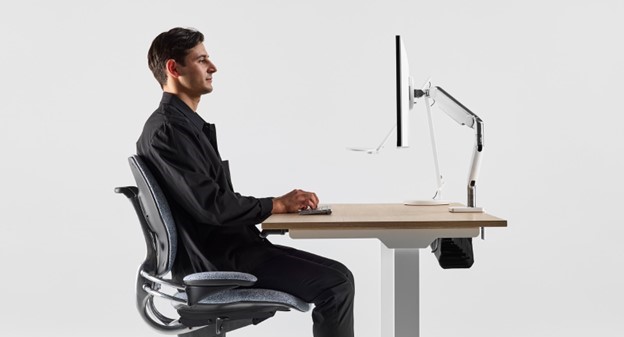
In today’s hybrid landscape, our computer usage continues to reach unprecedented levels year after year, making it crucial to design work environments that promote long-term health and comfort. We call these “ergonomic workstations” and one of the most impactful aspects of an ergonomic workstation is monitor positioning. In this guide, we’ll explore the importance of proper monitor placement, the health risks associated with poor positioning, and how monitor arms can revolutionize your workstation for the better.
The Health Benefits of Monitor Arms
Think a monitor stand is good enough? Think again. Without adjustability, you're forced to adapt to the screen instead of the screen adapting to you. This leads to bad posture, discomfort, and even injury. A monitor arm is essential for positioning your screen at the correct height, protecting your health and increasing your productivity.
Ergonomics is the science of designing workspaces and tools to fit the individual, helping to reduce the risk of discomfort, fatigue, and injury. Since the 1980s, ergonomic design has led to a significant decline in musculoskeletal injuries, emphasizing the need for proper adjustability in all aspects of workstation setup.
Monitor Positioning: The Key to Comfort
Monitor position significantly affects posture and visual comfort. The right monitor placement can reduce strain on the neck, shoulders, back, and eyes, contributing to enhanced overall wellbeing and productivity. Below are some shortcuts to proper monitor positioning:
- Eye Level: Because we look downward naturally at -15 degrees, the top of your monitor should be at or slightly below eye level when you’re sitting in a supported position.
- Distance: Place the monitor about an arm's length (20 to 30 inches) away from your eyes. You should not need to squint or lean forward to view your monitor. Placing the monitor too close to your eyes can also be fatiguing.
- Angle: Tilt your monitor 10 to 20 degrees away from your body such that your natural downward line of sight is about parallel to the screen.
- Alignment: Align the monitor with the midline of your body and the spacebar on your keyboard to avoid neck and trunk rotation. If using two monitors, place the primary monitor directly in front and the secondary one at an angle to reduce excessive head movement.
- Avoid Glare: Position your monitor perpendicular to windows or light sources to reduce screen glare. If needed, use an anti-glare screen or adjust your monitor's brightness and contrast settings to improve readability.
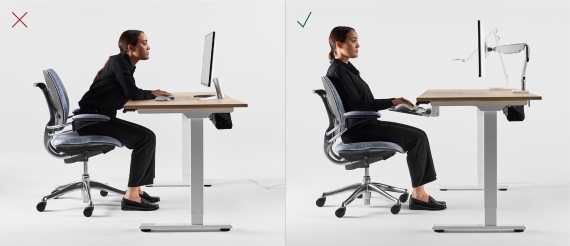
Monitor arms, which allow users to adjust the height, depth, and angle of their monitors, are essential tools for correct positioning. Monitor height and depth requirements also vary depending on whether a user is sitting or standing. For those who frequently switch between sitting and standing positions, monitor arms provide the necessary range of angles that standard monitor stands often lack.

Sitting vs. Standing: Finding the Right Monitor Height
When seated, monitors should be positioned at least an arm's length away to reduce strain. However, this distance may change when transitioning to a standing position, often requiring the monitor to be moved closer. Standard stands typically do not offer the flexibility needed to accommodate these shifts, but monitor arms make these adjustments effortless, supporting a healthier posture.
Adjusting for Individual Needs
Hand and eye positioning requirements can vary significantly between users. For example, there can be an 11-inch difference in proper monitor height between a 5th percentile female and a 95th percentile male. To accommodate the broad spectrum of users, especially in diverse work environments, monitor arms provide the necessary range of adjustability.
Health Risks From Poor Monitor Positioning
Incorrect monitor placement can lead to numerous health issues, including neck, back, shoulder, and eye discomfort. One common condition is Computer Vision Syndrome (CVS), which affects 90% of computer users and includes symptoms like eye strain, dry eyes, headaches, and watery eyes. Proper monitor positioning can help mitigate these symptoms and prevent long-term damage.
Neck Pain: A Growing Concern
Neck pain is one of the most prevalent issues linked to poor monitor placement. According to the National Health Interview Survey, 18 million working adults in the U.S. report experiencing neck pain, making it the fourth leading cause of work years lost due to disability. The key to preventing neck pain lies in maintaining a neutral neck posture, which can be easily achieved with a properly positioned monitor arm.

Improper monitor distance can also lead to eye strain. While the general recommendation is to place monitors at arm's length, factors such as age, prescription lens use, and screen size also play a role. Ultimately, personal comfort should dictate the exact positioning.
Beyond health benefits, monitor arms can help optimize limited workspace. With the average square footage per worker decreasing by 17% since 1994, creating adaptable workstations has become more important than ever. Monitor arms lift monitors off the desk, freeing up valuable surface area and allowing for better organization of other work tools.
Maximizing Space Efficiency
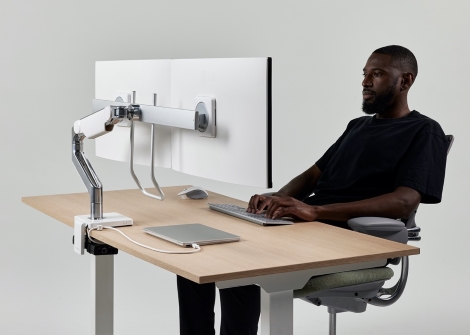
On shallow work surfaces, achieving proper monitor depth and alignment can be challenging when all tools are on the same level. Monitor arms offer a simple solution by elevating screens, increasing usable workspace by up to 20%. This added flexibility makes it easier to maintain ergonomic standards, even in compact areas.

Proper monitor positioning is essential for promoting a healthy, comfortable work environment. Monitor arms provide the necessary adjustability to accommodate a wide range of users, supporting both seated and standing positions. By investing in ergonomic solutions like monitor arms, organizations can reduce the risk of musculoskeletal issues, enhance employee comfort, and optimize workspace utilization.
At Humanscale, we are committed to helping organizations create healthier and more efficient workspaces. Our monitor arm solutions are designed to maximize comfort, support ergonomic standards, and adapt to the evolving needs of modern work environments. Contact us today to learn how we can help your organization prioritize employee health and productivity through innovative monitor positioning solutions.


.jpg)

